|
ME405: Mechatronics
Project Documentation and Portfolio by Neil Patel
|


|
|
ME405: Mechatronics
Project Documentation and Portfolio by Neil Patel
|
|
The objective of this assignment is to develop a a program that embodies the function of the vending machine of assignment HW0x00, where we created a state transition diagram. State transition diagrams are high–level design tools that can be used to ensure that code will function according to stated design requirements. The Vendotron runs cooperatively; the code does not contain any blocking commands.
The Vendotron operates without utilizing any 'blocking' commands and hence, functions cooperatively. The figure below depicts the machine that the Finite State Machine has been modeled after.
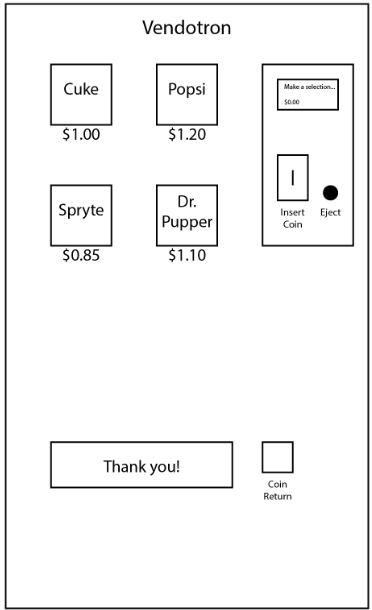
The Vendotron has several buttons including one for each kind of drink that is available. Additionally there is a small two-line LCD text display and coin return button as you would expect on an average vending machine.
The Vendotron exhibits the following features:
Beverage Selection:
'c' - Cuke
'p' - Popsi
's' - Spryte
'd' - Dr. Pupper
Insert Payment
'0' - Penny
'1' - Nickle
'2' - Dime
'3' - Quarter
'4' - $1
'5' - $5
'6' - $10
'7' - $20
Return Change
'e' - Eject change
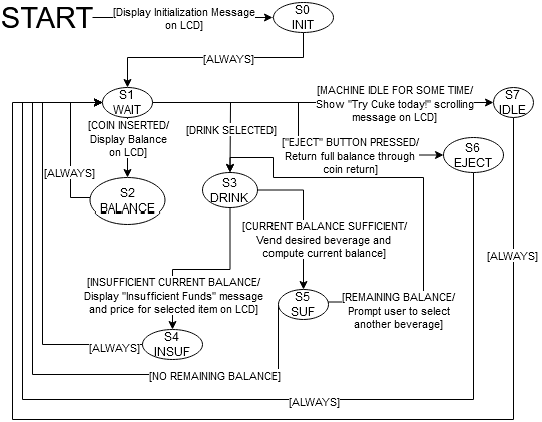
Documentation of this lab can be found here: Lab0x01
The source code for this lab: https://bitbucket.org/npatel68/me405_labs/src/master/lab1/vendo.py
 1.9.1
1.9.1